


FlightAware Flight Tracker
3.83.77K Reviews
App Specs
- Version
- 5.15.5
- Updated On
- License
- Free
- Downloads
- 10,000,000+
- Developer
- FlightAware
- Categories
- Travel & Local
- Platform
- Android, iOS
Screenshots
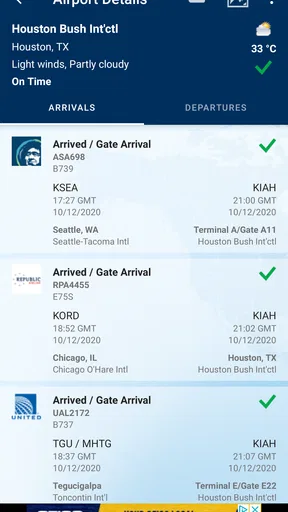
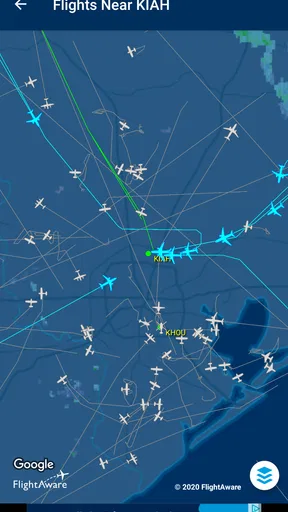
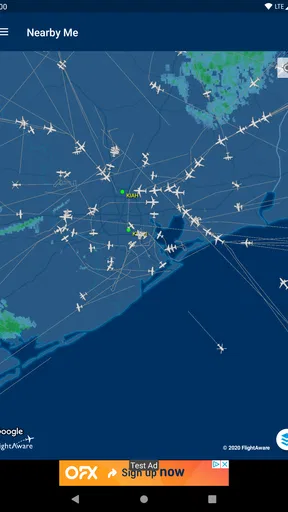
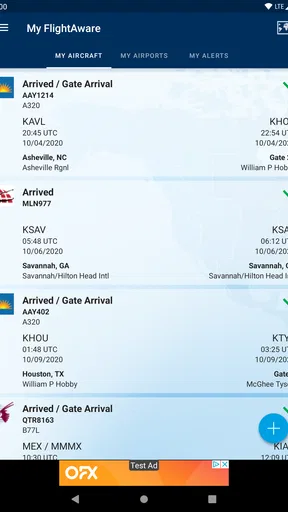
 Analysis by AppCompare
I judge a flight-tracking app not only by how much it shows, but by how well it helps me make decisions without turning curiosity into a demand to share more than I want. FlightAware Flight Tracker sits in the travel-and-local category, and its appeal is easy to understand: it can make the moving dots overhead, or the arrival time on a pickup plan, feel less mysterious. I also think it deserves a practical look rather than an automatic endorsement. Flight information can be useful, but the best way to use any tracker is to treat it as a planning aid, not as a guarantee or a substitute for an airline’s own instructions.
Trust starts with what you use it for
FlightAware is the developer behind the app, and the product is focused on tracking aircraft and flight activity. That focus makes it useful to several kinds of people: travelers checking a journey, friends coordinating a pickup, and aviation fans following aircraft for interest. Those are different needs, and they call for different levels of attention. A passenger may only need to check a flight number now and then; someone meeting an incoming flight may want to revisit the status as the arrival approaches; a hobbyist may spend longer exploring the map and flight details.
I would not use a flight tracker as the only source for a time-sensitive airport decision. A live view can help me understand what is happening, but I would still check the airline or airport for instructions that affect my own trip. That distinction is especially important if plans are tight: seeing an aircraft’s movement is not the same thing as knowing when a gate will be ready, when baggage will arrive, or whether a passenger has cleared the terminal.
Controls are part of the experience
The useful controls described in the app experience are practical rather than mysterious: search by flight number, airline, or airport, and set flight alerts when I want updates. I like that these choices match real tasks. Searching by a known flight number is the quickest route when someone has sent me their itinerary. Searching an airport or airline is more helpful when I am still comparing activity or do not have one particular flight in mind.
Alerts are valuable when I do not want to keep opening the app to check for a change. I would use them selectively, for a flight that affects a pickup or a connection, instead of enabling notifications for every journey I happen to browse. That keeps the signal useful and gives me a clear reason to receive an update. If I am only looking up a plane out of curiosity, a manual check is usually enough.
The app is free to install, with optional in-app purchases listed from $0.99 to $5.99 per item. That makes it easy to try the basic experience before deciding whether any paid option is worthwhile. I would first identify the feature I actually need and then decide whether it changes how I use the app; curiosity alone is not a reason to spend. The app is rated for Everyone, has been available since September 7, 2011, and its current version is 5.15.2. It requires Android 8.0 or later.
When flight information feels personal
Flight searches can involve details about another person’s travel, so I would be thoughtful about what I look up and what I share. If a relative gives me a flight number so I can time a ride, checking that specific trip is a straightforward use. If I am watching aircraft near home just for fun, I can keep the activity to my own curiosity rather than turning a public-facing tracking tool into a way to make assumptions about who is on board. A plane’s route does not tell me anything reliable about its passengers.
Worth Reading Before You Choose

Flipboard Shows What News Apps Must Do Beyond the Feed

Switching to Android Auto Means Rethinking Your Driving Routine

Google Calendar Makes a Crowded Week Easier to Manage

Ludo King Makes the Most of the Minutes Between Plans

Baby Panda World Brings Quick Play to Modern Phones, but Its Game Library Feels Busy

ESPN’s Live Game View Makes Following Close Games Easier
I also avoid treating an alert or map position as a promise. Flight status can change, and a tracker’s information is most useful when it prompts me to recheck the practical details that matter. For a pickup, I might use it to decide when to leave home, then confirm the arrival through the airline or airport before committing to a tight schedule. This small habit limits the chance that a convenient notification becomes the sole basis for a rushed decision.
Make the app work on your terms
My preferred workflow is simple: search for the flight I care about, look at the status and map if they answer a real question, and set an alert only if I need to be notified later. When the task is over, I do not need to keep following the flight. That approach makes the app feel like a tool I control rather than a stream I have to monitor. The account and device choices available to any user can vary, so I would review the prompts and settings shown on my own device instead of assuming that every setup is identical.
For a traveler who wants booking, check-in, boarding passes, and trip management in one place, an airline’s own app is usually the better primary companion. For someone who mainly wants route options and to compare fares, a travel-search app is a more direct fit. FlightAware is strongest when the question is about a flight’s progress or nearby aircraft, not when the task is organizing an entire holiday. It complements those tools more naturally than it replaces them.
Its scale suggests broad interest: FlightAware has over 10 million installs, with an average rating of 3.7 from around 45,000 ratings and roughly 3,700 written reviews. I take that as context, not proof that it will suit every traveler. The range of people using it is likely wide, while my own decision would come down to whether flight tracking is something I need often enough to keep a dedicated app on my phone.
There is also a sensible boundary for privacy-minded users: install only if the tracking features are useful to you, pay attention to any permission request as it appears, and decide whether it fits the task before granting access. I do not assume that a feature needs a particular permission unless the app clearly explains that need on the device. That habit applies to this app just as it does to any travel tool, especially when a quick lookup can often be done without sharing more context than necessary.
For me, the strongest case is a recurring practical one: I am collecting someone from the airport, traffic and timing are uncertain, and I want a better sense of whether their flight is progressing as expected. I can search the flight, check its status, and use an alert if I need to focus on something else. The weaker case is expecting the app to answer every airport question, from terminal changes to the best place to wait. Keeping those roles separate makes its information more useful and avoids overreliance.
Ever found yourself daydreaming about flying high above the clouds, wondering exactly where that plane zooming past your window is headed? Well, you're not alone, and guess what? There's an app for that! Welcome to the world of FlightAware Flight Tracker, an app that's as fascinating as it is functional. Let me tell you all about my experience with it.
Tracking Flights Like a Pro
First things first, FlightAware Flight Tracker is all about real-time flight tracking. I dove into it expecting just a basic flight status tool, but boy, was I in for a surprise. This app is a treasure trove of information for aviation enthusiasts, frequent flyers, and even those of us just curious about the skies above.
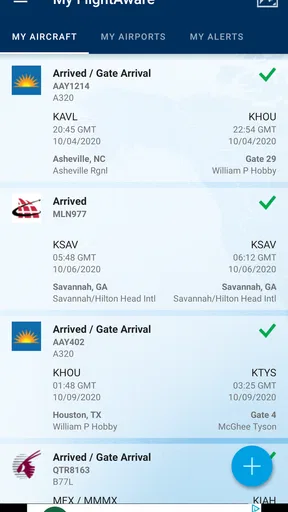
Upon opening the app, you're greeted with a clean, user-friendly interface. Seriously, you don't need to be tech-savvy to navigate this one. The home screen provides a quick overview of flight statuses, delays, and cancellations. I found it super handy, especially when I had to pick up a friend from the airport. No more guessing games about whether their flight was on time or delayed!
Features That Stand Out
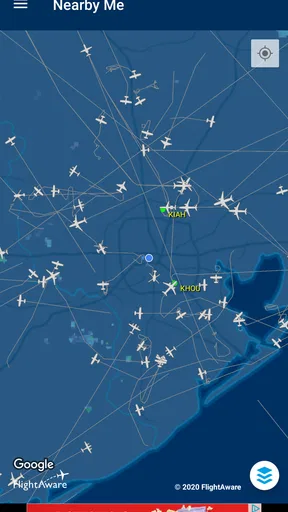
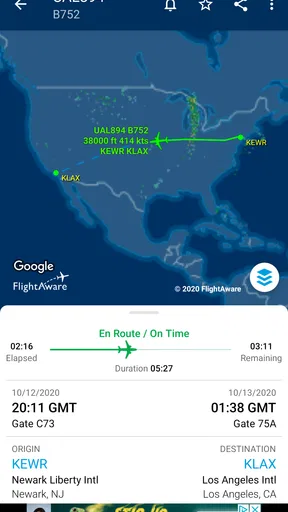
What really wowed me were the extra features packed into this app. You can track flights by airline, airport, or even specific flight numbers. But the real magic happens when you zoom in on the map. The live map feature lets you see the exact location of a plane, its altitude, and speed. It’s almost like having a mini air traffic control room right in your pocket.
Another feature that caught my attention is the ability to set alerts for flights. Have a loved one flying in? You can set push notifications to get updates on their flight status. It’s a game-changer for those who worry about flight delays and need to plan accordingly.
Digging Deeper: The Details
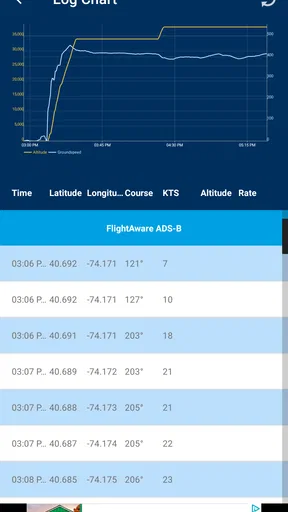
FlightAware doesn’t stop at just telling you where a plane is. It goes deeper, providing historical data on flights and airlines. Curious about how often a specific flight is delayed? You can find out. The app's detailed data analytics can be a lifesaver when planning trips, helping you choose the most reliable flights based on historical performance.
For the more tech-inclined, there’s also an option to view weather overlays and aviation charts. While I didn’t dive too deep into this, it’s there for those who want to nerd out on aviation data.
Using the App: My Personal Take
I found FlightAware Flight Tracker to be incredibly intuitive. Setting up notifications and searching for specific flights was a breeze. The app did not bombard me with ads or unnecessary pop-ups, which is a huge plus in my book. It felt like the developers genuinely focused on user experience.
One evening, I was curious about a plane flying over my neighborhood. Within seconds, I identified the flight, its origin, destination, and even its model. It’s an oddly satisfying feeling to have that kind of information at your fingertips.
Final Thoughts: Is It Worth It?
So, is FlightAware Flight Tracker worth the download? Absolutely. Whether you’re a frequent traveler, a worried parent, or just someone with a fascination for aviation, this app is a must-have. It’s reliable, packed with features, and offers a seamless user experience.
In a world where information is power, FlightAware Flight Tracker puts powerful flight data right in your pocket. So next time you spot a plane in the sky, you won’t just wonder where it’s headed—you’ll know.
Pros
- Real-time flight tracking with detailed data.
- User-friendly interface with intuitive design.
- Customizable alerts for specific flights.
- Global coverage with extensive airport data.
- Supports both commercial and private flights.
Cons
- Ads can be intrusive in the free version.
- Some features require a premium subscription.
- Occasional data refresh delays.
- Limited offline functionality.
- High battery usage during prolonged tracking.
FAQs for FlightAware Flight Tracker
What features does FlightAware Flight Tracker offer?
FlightAware Flight Tracker provides real-time flight tracking with detailed maps and flight status updates. Users can access flight departure and arrival information, gate changes, delays, and cancellations. The app also offers alerts for flight status changes and supports multiple tracking options, including by aircraft registration number, route, airline, or airport.
Is FlightAware Flight Tracker free to use?
Yes, FlightAware Flight Tracker is free to download and use, offering a range of features without charge. However, there is a premium subscription available that provides additional benefits, such as ad-free browsing, more detailed weather overlays, and the ability to track more flights simultaneously.
Does FlightAware Flight Tracker require an internet connection?
Yes, an internet connection is necessary for FlightAware Flight Tracker to function properly. The app relies on real-time data updates for accurate flight tracking and status changes. A stable Wi-Fi or mobile data connection ensures that users receive the most current flight information.
Is FlightAware Flight Tracker available on both Android and iOS?
FlightAware Flight Tracker is available on both Android and iOS platforms. Users can download the app from the Google Play Store for Android devices and the Apple App Store for iOS devices, ensuring compatibility with a wide range of smartphones and tablets.
How accurate is the flight tracking information provided by FlightAware?
FlightAware Flight Tracker is known for its reliability and accuracy, using data from multiple sources, including air traffic control systems and airlines. While it provides real-time updates, slight discrepancies can occur due to external factors like weather conditions and air traffic changes. However, it remains one of the most trusted flight tracking apps available.


